
Vespera Loop-Fight Controls
Name the switches correctly so overnight combat is a setting, not a guess.
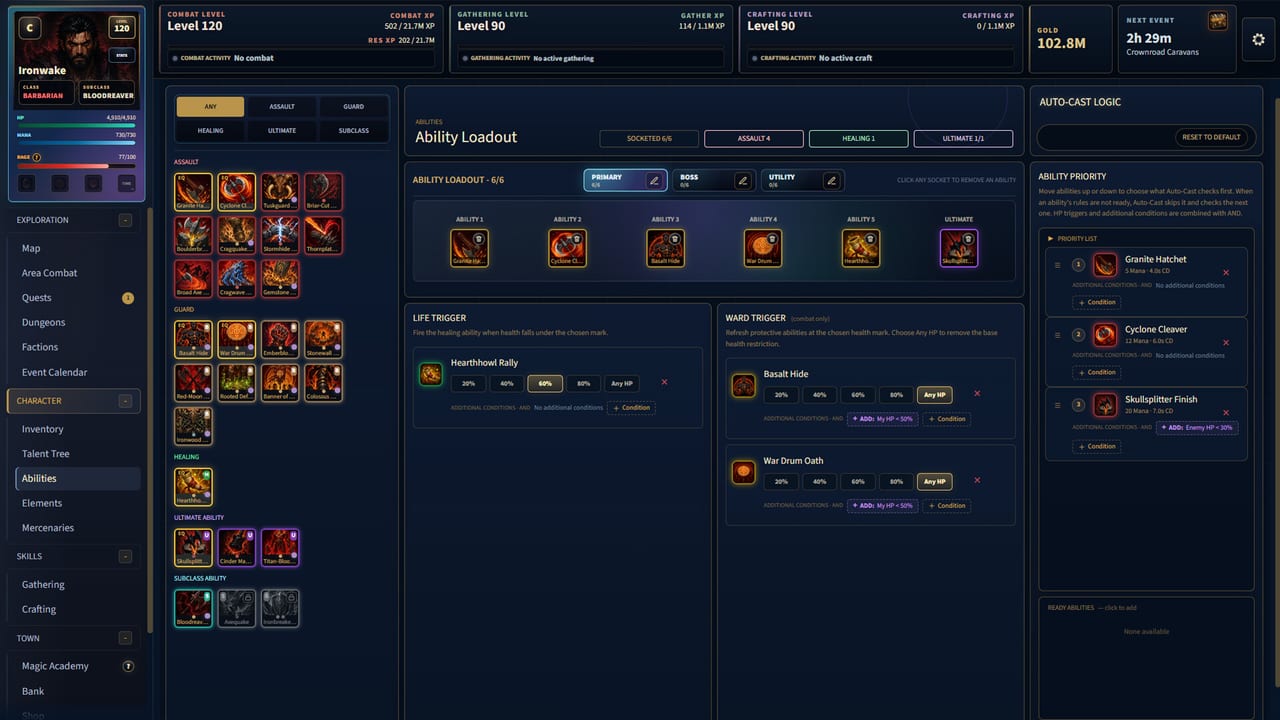
Vespera is a mouse-first idle RPG. The store lists a mouse-required note, a mouse-only accessibility option, and Steam Deck as Playable. The important 1.0 habit is not a hidden keybind. It is naming the combat loop correctly, then putting every spender, shield, and potion on a condition you can leave running. Pair this page with getting started on day one and with combat and offline before a 24-hour window.
Loop-Fight is the old Auto-Combat switch
Patch 0.11.3 renamed Auto-Combat to Loop-Fight and cleaned the ON/OFF behavior. If a July guide still says Auto-Combat, look for Loop-Fight in the client. The loop is not a cheat toggle. It is a loadout: filler, spender, defensive cooldown, then potions. Watch one pack by hand, copy that order into Auto-Cast Logic, then turn Loop-Fight on.
The Abilities screen is the real control panel. Primary, Boss, and Utility sockets sit above a priority list. Life Trigger and Ward Trigger fire heals and guards when health crosses a mark. Extra conditions stack with AND. Clockless Rush, from the same 0.11.3 pass, works with the Any HP Auto-Cast condition — useful when a skill should fire every loop, not only when you are dying.
What to bind before you walk away
- Filler that applies your class identity: bleed, burn, trap, or poison. See the tier list.
- Spender or execute that should not clip the filler.
- Shield, barrier, or dodge on a 40–50 percent health Ward Trigger, not at 95 percent.
- Auto mana and auto food thresholds you can actually stock from gathering.
- Loot rules that keep crystals and engravings and vendor the rest.
If Loop-Fight is on and the Damage Report shows empty minutes, the priority list is wrong or the bag is empty. Open the report before you blame the class.
Escape menu, save, and audio
0.11.3 added an Escape Game Menu with audio controls, Settings, save status, and Save and Quit. Use it. Idle RPGs still need a clean quit after a long Tower reclaim so the next load does not replay a half-written offline window. High UI Scale got a pass across pages, dialogs, item previews, Crafting, and Inventory. If text clips on a 4K monitor, raise scale from that menu rather than from a random Windows setting.
Keyboard labels were localized in the 0.15.x Spanish and Thai pass. The intended input is still mouse. Steam Deck is Playable with mouse emulation, not a bespoke gamepad rewrite. Pause Spire auto-advance before you dock the handheld if you do not want a Tarot choice made while the device sleeps. Details on Tower and Spire.
Damage Report
The same mid-EA patch added a permanent Damage Report with interactive charts, ranked damage sources, fight history, personal records, and survival statistics. Use it after a dungeon or a world-boss pull. If your mercenary outdamages you, that is a roster win, not a bug. If potions account for more “healing” than your class shield, your Ward Trigger is late. The in-game combat math page and this report are the two tools this wiki will not try to fake with a spreadsheet.
Raid Boss Combat Log and Close controls were pinned below the Windows titlebar at every resolution and UI scale in 0.15.1. If a log is hiding under the bar, update the client.
Linux, Proton, and inventory clicks
Inventory and Bank dropdowns were fixed for Linux and Proton in 0.11.3. If you play through Proton on Deck or a Linux box and a dropdown eats clicks, you are on an old build. 1.0 includes that fix.
After the settings pass
Leave Loop-Fight on a pack you already clear. Start a gathering node. Send mercenaries on expeditions. If a Titan is due, read factions before you donate the last flask. If gems are the hole, open elements and gear and gems. Official cinematic footage lives on the homepage; this page is the switchboard, not the trailer.
Frequently Asked Questions
Quick answers players search after the Vespera 1.0 launch.
Where did Auto-Combat go in Vespera?
It was renamed Loop-Fight in patch 0.11.3. The ON/OFF switch is the same idea with clearer labeling.
Does Vespera support a gamepad?
The store requires a mouse. Steam Deck is Playable with mouse emulation. Use the Escape menu for audio and save, not a hidden gamepad overlay.
What is the Damage Report for?
Charts and ranked sources for the last fights. Use it to see whether Loop-Fight, potions, or a mercenary actually carried the session.